Original Message:
Sent: Apr 21, 2025 10:58 AM
From: Dmitri Gornev
Subject: LCU error 0x800f0838 after inplace upgrade Win11 24H2
Hi Nonya, support for multiple updates is added to the backlog for the next version of Patch datafeed (ETA later this year).
Original Message:
Sent: Apr 21, 2025 08:58 AM
From: Nonya
Subject: LCU error 0x800f0838 after inplace upgrade Win11 24H2
Hi Dmitri,
Do you have any updates on this? We started receiving this ourselves with some in-place upgrades to Server 2025 we recently did.
Original Message:
Sent: Feb 27, 2025 10:59 AM
From: Dmitri Gornev
Subject: LCU error 0x800f0838 after inplace upgrade Win11 24H2
Hi Johannes,
thank you for detailed report! We're looking into possibility to package checkpoint update with monthly updates to be able to re-apply it where needed or provide better troubleshooting capabilities.
Original Message:
Sent: Feb 07, 2025 04:02 AM
From: J E
Subject: LCU error 0x800f0838 after inplace upgrade Win11 24H2
Hi,
after successful inplace upgrade to Win11 24H2 I found the following situation:
The latest cumulative update (LCU) could not be installed anymore.
In my example this is the monthly patch from January 2025:
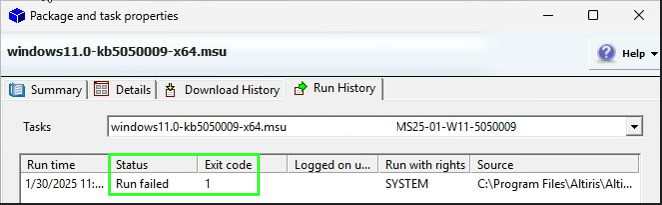 It failed with error code 1.
Windows Event Log:
Windows update "Security Update for Windows (KB5050009)" could not be installed because of error 2148468792 "" (Command line: ""C:\WINDOWS\system32\wusa.exe" "C:\Program Files\Altiris\Altiris Agent\Agents\SoftwareManagement\Software Delivery\{...}\cache\windows11.0-kb5050009-x64.msu" /quiet /norestart")
When I tried to execute the msu manually, I got the following error: 0x800f0838
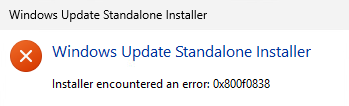
So this was my starting point for further investigation.
The reason for the problem is a new so called "checkpoint" update introduced by Microsoft.
MS:
https://support.microsoft.com/en-us/topic/-operation-is-not-supported-error-installing-a-post-checkpoint-update-by-double-clicking-the-msu-package-86b89ef4-d5d3-4a2d-b471-3d67c8ea4f0e
This problem occurs because the FoD or LP that was added from a local source on top of the latest checkpoint cumulative update cannot be updated to the latest update without connectivity to WU or WSUS.
So if you use any package from FoD (Feature on Demand) or any language pack and no Windows Update or WSUS (most likely the case when you use ITMS Patch Management Solution), than you have this situtation.
Solution:
In order to install the "post-checkpoint" update, you need to install the checkpoint update itself as well.
Download the patch from Microsoft Update Catalog:
https://www.catalog.update.microsoft.com/Search.aspx?q=KB5050009
in the download dialog it shows you two updates instead of only KB5050009:
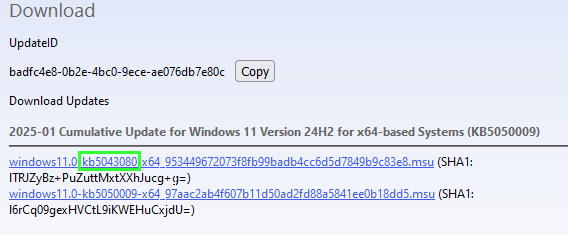
The command to install the LCU is:
Add-WindowsPackage -Online -PackagePath c:\temp\packages -NoRestart
c:\temp\packages is just an example!
In the "packages" folder you need to have only the two updates (MSU files) provided in the download from Microsoft.
 After I executed this command, the update was successfully applied on the next reboot.
A short test with the preview of the February 2025 update for Win11 24H2 showed that this should be a one time problem, the preview was installed by Patch Management Solution without issues.
If you experience the same problem, please post here.
If more people are affected it would make sense to implement the solution in the product.
Best Regards
JE