My apologies, the entirety of my last response did not get posted. Here is the rest of it.
Config file for SIMS com object to use TLS 1.2
JDMV0040.EXE.config
<?xml version="1.0" encoding="utf-8"?>
<configuration>
<runtime>
<AppContextSwitchOverrides value="Switch.System.Net.DontEnableSystemDefaultTlsVersions=false;Switch.System.Net.DontEnableSchUseStrongCrypto=false" />
</runtime>
</configuration>
The value "Switch.System.Net.DontEnableSystemDefaultTlsVersions=false;Switch.System.Net.DontEnableSchUseStrongCrypto=false" configures .NET applications to use secure and strong cryptographic settings for Transport Layer Security (TLS) connections. Setting DontEnableSystemDefaultTlsVersions to false allows the operating system to select the protocol, while setting DontEnableSchUseStrongCrypto to false ensures the application uses stronger cryptography and blocks insecure protocols.
Explanation of the Switches
Switch.System.Net.DontEnableSystemDefaultTlsVersions=false
- Purpose: This switch tells the .NET Framework to let the operating system choose the TLS protocol version rather than the framework picking it.
- Impact: By setting this to
false, your application benefits from the most secure and up-to-date TLS protocol available on the operating system.
Switch.System.Net.DontEnableSchUseStrongCrypto=false
- Purpose: This switch ensures that your application uses strong cryptographic algorithms and protocols, rather than potentially weaker ones.
- Impact: Setting this to
false prevents the use of insecure protocols like SSL and older TLS versions, significantly improving the confidentiality and security of your application's network communications.
How to Use These Switches
These switches are typically set within the <AppContextSwitchOverrides> element in your application's configuration file (app.config or web.config) to control behavior for different .NET versions:
Code
<configuration> <runtime> <AppContextSwitchOverrides value="Switch.System.Net.DontEnableSystemDefaultTlsVersions=false;Switch.System.Net.DontEnableSchUseStrongCrypto=false" />
</runtime>
</configuration>
Key Considerations
. For applications targeting .NET Framework 4.7.1 or later, DontEnableSchUseStrongCrypto defaults to false, and for .NET 4.7 and later, DontEnableSystemDefaultTlsVersions defaults to false.
. Explicitly setting these switches to false ensures your application uses secure defaults, which is crucial for protecting sensitive data during network communication.
------------------------------
Doug Seaver
Systems Development Services Specialist
Gen Tool Support
WisDOT
Madison, WI, USA
------------------------------
Original Message:
Sent: Aug 25, 2025 05:00 PM
From: Douglas Seaver
Subject: How to initiate a TLS 1.2 connection to external vendor from a GUI client?
FYI, we found a way to get this working so that our developers and application testers can move forward. Whether this is a solution or a workaround to our support case, I will leave to the engineering team.
Following are details of what is working for us as of today.
Here's some documentation on what these settings do in the config file.
Original Message:
Sent: 8/18/2025 1:47:00 PM
From: Amit Dwivedi
Subject: RE: How to initiate a TLS 1.2 connection to external vendor from a GUI client?
Hi Doug,
I am guessing that your system might be defaulting to TLS 1.0. To enable modern TLS versions (like TLS 1.2 and TLS 1.3) , you'll need to update your Windows Registry settings for Secure Channel (Schannel).
Schannel is the component Windows uses for secure communications, and configuring its protocols in the registry provides fine-grained control over how your client and server applications negotiate TLS connections.
Steps to Configure Schannel Protocols:
- Navigate to the following registry key:
HKEY_LOCAL_MACHINE\SYSTEM\CurrentControlSet\Control\SecurityProviders\SCHANNEL\Protocols - Under this
Protocols key, you can create (or modify existing) subkeys for the desired TLS versions, such as TLS 1.2 and TLS 1.3. - Within each TLS version subkey, you can further create
Client and/or Server subkeys depending on whether you want to control client-side or server-side behavior. - Inside these
Client and Server subkeys, create two DWORD (32-bit) values:DisabledByDefault (set to 0 to enable, 1 to disable)Enabled (set to 1 to enable, 0 to disable)
For detailed instructions and best practices on securing TLS configurations, please refer to these official Microsoft resources:
Let me know if this helps,
Amit
Original Message:
Sent: Aug 18, 2025 10:38 AM
From: Douglas Seaver
Subject: How to initiate a TLS 1.2 connection to external vendor from a GUI client?
We are trying to initiate a TLS 1.2 connection to an external vendor from a GUI client and are failing. The wireshark trace indicates that we are sending a TLS 1.0 HELLO. How can we specify TLS 1.2 instead? The interface is provided by a .COM DLL provided by the vendor.
Following is a code snippet which shows our Gen AB creating the GUIOBJect (which is failing).
__________________________________
1 ! NOTE
1 ! ======================================================================
1 ! Description..: Communicates with external vendor application. This is
1 ! done through a trigger DLL which is a COM object that
1 ! will act as the bridge between GUI Client and external vendor.
1 ! It is responsible for waking the Processing module,
1 ! transmitting the required keywords and resetting the
1 ! Processing module when a transaction is complete.
1 ! ======================================================================
2 !
3 ! EXIT STATE IS processing_ok
4 !
5 ! +-- CASE OF in_com interface_com_area com_method
5 ! --- CASE "SCAN"
6 ! !
7 ! ! NOTE
7 ! ! ======================================================================
7 ! ! Scan. Create Object. The Create is what is failing because of TLS V1.
7 ! ! ======================================================================
8 ! !
9 ! ! SET lcl interface_com_area com_object TO CreateObject ( "Ext.Vendor.Com.Interop.Interface" )
from the trace:
From your screenshot, this stands out to me.
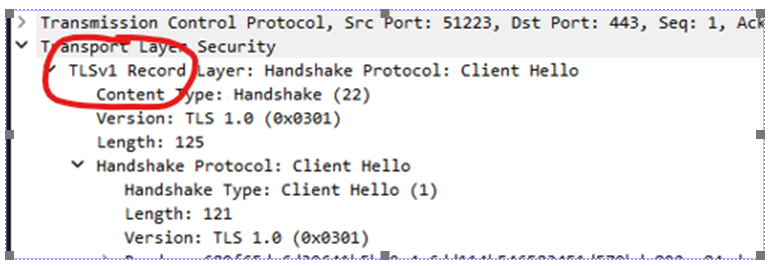
TLS v1 is not usually supported in newer applications
------------------------------
Doug Seaver
Systems Development Services Specialist
Gen Tool Support
WisDOT
Madison, WI, USA
------------------------------