Original Message:
Sent: Sep 05, 2024 05:24 AM
From: Christopher Dooks
Subject: Unable to Site Pair
That looks to be an underlay reachability issue, where the Connector cannot reach the HCX Cloud Manager.
Original Message:
Sent: Sep 04, 2024 11:48 AM
From: 9990374530
Subject: Unable to Site Pair

We have Fortigate which is the outbound router , but as long as the traffic is flowing through the SSTP VPN tunnel, that Fortigate should be transparent
Original Message:
Sent: Sep 04, 2024 11:15 AM
From: Christopher Dooks
Subject: Unable to Site Pair
How is the connectivity between Connector and AVS Manager? Any kind of inspection/firewall in place which could be impacting the traffic flow? Port 443 allowed?
Original Message:
Sent: Sep 04, 2024 11:12 AM
From: 9990374530
Subject: Unable to Site Pair
Version : 4.8.2.0
Original Message:
Sent: Sep 04, 2024 10:55 AM
From: Christopher Dooks
Subject: Unable to Site Pair
Ah apologies, I misread.
With AVS, you get given a public URL to connect to. Do you know what version of HCX is deployed in AVS?
https://learn.microsoft.com/en-us/azure/azure-vmware/configure-vmware-hcx
Original Message:
Sent: Sep 04, 2024 10:39 AM
From: 9990374530
Subject: Unable to Site Pair
I believe this article will need to follow once I do the HCX site pairing from on premise HCX connector to cloud HCX manager?
Original Message:
Sent: Sep 04, 2024 10:32 AM
From: Christopher Dooks
Subject: Unable to Site Pair
Did you follow this article?
https://learn.microsoft.com/en-us/azure/azure-vmware/enable-hcx-access-over-internet
Original Message:
Sent: Sep 04, 2024 10:31 AM
From: 9990374530
Subject: Unable to Site Pair
I need to make this setup configure over internet.
Original Message:
Sent: Sep 04, 2024 10:22 AM
From: Christopher Dooks
Subject: Unable to Site Pair
What is the connectivity between source and destination? Is it over ExpressRoute? Or are you trying to configure it over the public internet?
Original Message:
Sent: Sep 04, 2024 10:20 AM
From: 9990374530
Subject: Unable to Site Pair
any suggestions would be appreciated.
Tried with different browser.
When I tried to ping cloud HCX from hcx connector getting packet filtered response
From x.x.x.x icmp_seq=3 Packet filtered
Maybe if I dont set up Under Resolution Address select either the Public IP address or the Private IP, like we do in VMC on AWS?
Original Message:
Sent: Sep 04, 2024 07:19 AM
From: 9990374530
Subject: Unable to Site Pair
Hi team,
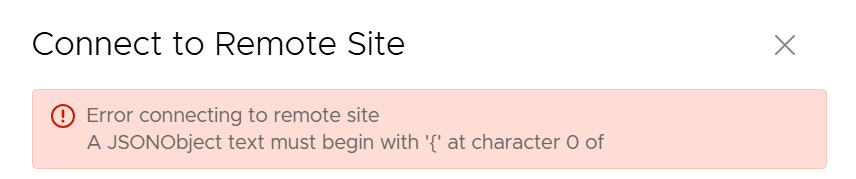
Getting error while doing hcx site pairing from on-premise to cloud in AVS.