I tried several options, only the 8443 port works. Other ports don't seem to pick up the websocket event and process the OnUpgrade request as a standard http call. I will open a ticket for this.
Original Message:
Sent: Nov 05, 2026 10:51 PM
From: Raju Gurram
Subject: Using the Same Port for Both WebSocket and HTTP Example
I don't think that's the case, as it should work with any listening ports; I've tested it with non-default ports and encountered no issues. Please open a ticket if the issue is persisted so an engineer can take a closer look by diagnosing the browser and SSG logs.
Thanks.
Original Message:
Sent: Nov 05, 2026 05:08 AM
From: Remco Dekker
Subject: Using the Same Port for Both WebSocket and HTTP Example
@Raju Gurram
No, I didn't hardwire the listen port. I was using listenport 10443 for this and it was hardwired previously, so I created a new port 12443. This also was not working. As you got it working and mentioned you were using the default 8443 port, I changed the setting for 8443 on my gateway to accept websockets. This worked instantly!
Is this correct that websockets are only working for 8443 and not for custom ports? Should I create a support ticket for this?
------------------------------
Remco Dekker
Enable U
------------------------------
Original Message:
Sent: Nov 05, 2026 03:58 AM
From: Raju Gurram
Subject: Using the Same Port for Both WebSocket and HTTP Example
I tried the same way. I published the service with wild-card for proxying the entire app through the gateway.
After your message, I retried without Regex assertion, it is still working.
Are you still going with hardwiring the service to listen port? If YES, please try once without hardwiring it.
Original Message:
Sent: Nov 05, 2026 03:15 AM
From: Remco Dekker
Subject: Using the Same Port for Both WebSocket and HTTP Example
@Raju Gurram
Actually this is not the issue. As mentioned I set the service resolution path to /*. So the service will also be triggered by the upgrade call.
You can see this in the audit from screenshot shared in my last message. The webpage was build from a previous normal http request. This audit is from the javascript to connect to the websocket. The headers show this is the Upgrade request. Problem is the gateway didn't set the ${websocket.event} variable to OnUpgrade .
------------------------------
Remco Dekker
Enable U
------------------------------
Original Message:
Sent: Nov 05, 2026 01:25 AM
From: Raju Gurram
Subject: Using the Same Port for Both WebSocket and HTTP Example
@Remco Dekker
Now, it is clear to me about the issue. As you are proxying the app, underlying javascript is trying to connect to websocket using https://<host>/
This is creating a problem. As this is not matched to any service, websocket request is not getting upgraded. It seems to be an edge case, still can be seen like an issue. You may submit a defect.
Otherwise, you may consider changing the app using Regex assertion with match-and-replace strategy to get it working.
pattern: window.location.host
replace: window.location.host + '/.any'

Thanks.
Original Message:
Sent: Nov 04, 2026 12:54 PM
From: Remco Dekker
Subject: Using the Same Port for Both WebSocket and HTTP Example
Hi @Raju Gurram
Thanks for your response. I imported your export. This is pretty much the same as I already had, except for the normal http message routing to proxy the complete demo at https://echo.websocket.org/.ws.
In the last branch I replaced the Template response with an actual http routing assertion. (You will need to replace the Accept-encoding header to stop responding with zstd).
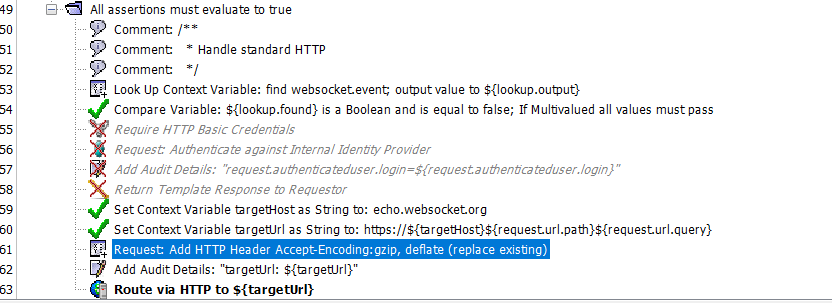
This handles the first HTTP call to request the page including the script to start wss. The page builds fine and it starts to try to connect a websocket. The upgrade request is going to /, so I changed the service resolution path to /*.
However, the upgrade message doesn't seem to set the ${websocket.event} variable as my added audits at the start of the policy show. As the variable is not OnUpgrade or OnMessage the policy ends with handling standard HTTP:
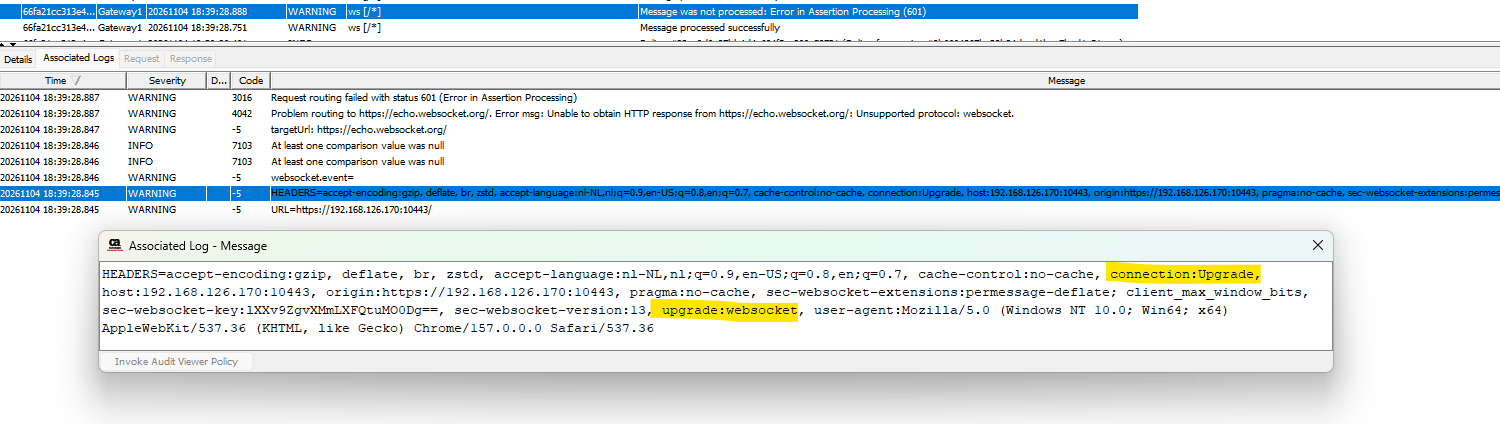
------------------------------
Remco Dekker
Enable U
------------------------------
Original Message:
Sent: Nov 03, 2026 11:12 AM
From: Raju Gurram
Subject: Using the Same Port for Both WebSocket and HTTP Example
@Remco Dekker
Sorry for the delay. I was out of office.
I'm attaching the graphman bundle (ws.json) to proxy the chosen websocket service via gateway. This bundle introduces a service and a trusted certificate. Assuming that the 8443 port is configured to allow WebSocket traffic, you should be able to open a websocket via the newly published service using wss://<your-gateway-host>:8443/.ws URL.
Besides this, as you've noticed, this is not working as expected if the listen port is hardwired to a particular service unless we use the same URL of the service that is used for hardwiring.
For example, If 8443 is hardwired to /xyz service, you should be able to connect to websocket if the websocket url is wss://<your-host>:8443/xyz
Original Message:
Sent: Nov 03, 2026 08:30 AM
From: Remco Dekker
Subject: Using the Same Port for Both WebSocket and HTTP Example
@Raju Gurram
Do you have a working proxy service at the L7 Gateway for the demo at https://echo.websocket.org/.ws (or to any other public demo) which combines https and wss traffic? Can you share your policy and configuration to get this working?
Really appreciated.
------------------------------
Remco Dekker
Enable U
------------------------------
Original Message:
Sent: Oct 28, 2026 06:45 AM
From: Remco Dekker
Subject: Using the Same Port for Both WebSocket and HTTP Example
For your information, testing is on 11.2.2 appliance gateway.
------------------------------
Regards,
Remco Dekker
Enable U
------------------------------
Original Message:
Sent: Oct 27, 2026 06:41 AM
From: Remco Dekker
Subject: Using the Same Port for Both WebSocket and HTTP Example
@Raju Gurram
The demo script at /.ws is calling the websocket messages at the root path. This conflicts with other services on my gateway. So to be sure every call at this specific port is resolved to this service I bound this port to this service policy to handle all calls. This specific port is setup for HTTPS and in the Other settings the websocket option was enabled as shown in the Protocol column in the Manage Listen Ports overview.
As you see in my previous comment the http headers show it is a upgrade message, but the ${websocket.event} variable remains empty
------------------------------
Regards,
Remco Dekker
Enable U
------------------------------
Original Message:
Sent: Oct 27, 2026 06:24 AM
From: Raju Gurram
Subject: Using the Same Port for Both WebSocket and HTTP Example
@Remco Dekker
I'm bit confused with the below statement. Are you saying about hardwiring the listen port to particular published service? This is not necessary.
"I associated the specific port with the published service, so all requests will be handled by this policy"
Choose one of the existing listen ports and enable WebSocket for it using Other Settings tab from the Listen Port Properties dialog.
If everything goes well, you will observe the logs similar to the below lines.
INFO 361 com.l7tech.server.policy.assertion.ServerAuditDetailAssertion: -4: websocket.event=OnUpgrade
INFO 361 com.l7tech.server.message: Processing request for service: ws [/ws]
INFO 376 com.l7tech.server.policy.assertion.ServerAuditDetailAssertion: -4: websocket.event=OnMessage
INFO 376 com.l7tech.server.policy.assertion.ServerAuditDetailAssertion: -4: websocket.onMessage.direction=ClientToGateway
WARNING 376 com.l7tech.server.policy.assertion.ServerAuditDetailAssertion: -5: Entered ClientToGateway handler, the message body:Hello, World! My Pet is dog
Original Message:
Sent: Oct 27, 2026 04:57 AM
From: Remco Dekker
Subject: Using the Same Port for Both WebSocket and HTTP Example
Hi @Raju Gurram,
Thanks for answering. This is in line with my understanding of working with a https/wss combined port.
I associated the specific port with the published service, so all requests will be handled by this policy.
Still when I test this, I see the http message for the OnUpgrade (in http header connection:Upgrade, upgrade:websocket), but the variable ${websocket.event} remains empty. So the policy fails to set the websocket.onUpgrade.connectToServerUri as it is following the http logic.
audit lines at start of policy:
2026-10-27T09:45:22.776+0100 WARNING 295 com.l7tech.server.policy.assertion.ServerAuditDetailAssertion: -5: URL=https://192.168.126.170:10443/
2026-10-27T09:45:22.776+0100 WARNING 295 com.l7tech.server.policy.assertion.ServerAuditDetailAssertion: -5: HEADERS=accept-encoding:gzip, deflate, br, zstd, accept-language:nl-NL,nl;q=0.9,en-US;q=0.8,en;q=0.7, cache-control:no-cache, connection:Upgrade, host:192.168.126.170:10443, origin:https://192.168.126.170:10443, pragma:no-cache, sec-websocket-extensions:permessage-deflate; client_max_window_bits, sec-websocket-key:S4q62MqyFjTms2uCQudMqw==, sec-websocket-version:13, upgrade:websocket, user-agent:Mozilla/5.0 (Windows NT 10.0; Win64; x64) AppleWebKit/537.36 (KHTML, like Gecko) Chrome/156.0.0.0 Safari/537.36
2026-10-27T09:45:22.777+0100 WARNING 295 com.l7tech.server.policy.assertion.ServerAuditDetailAssertion: -5: websocket.event=
------------------------------
Regards,
Remco Dekker
Enable U
------------------------------
Original Message:
Sent: Oct 27, 2026 02:12 AM
From: Raju Gurram
Subject: Using the Same Port for Both WebSocket and HTTP Example
@Remco Dekker
Proxying the websocket communication via same port is handled through the single published service. We don't need to maintain separate services for handling inbound/outbound+connection/message policies.
Executing policy context can provide enough details for processing the messages (via ${websocket.event}, ${websocket.onMessage.direction}, etc).
During the websocket.event=OnUpgrade, either we can define the protected websocket connection url (websocket.onUpgrade.connectToServerUri) or none. When it is not defined, gateway processes the messages by itself to the caller.
In the sample policy, look for the SET Context Variable websocket.onUpgrade.connectToServerUri assertion and see if it is pointing to the intended websocket url or not. You may even try not populating this context variable also for quick demo.